



I really like Squarespace. Their support of many of my favorite podcast (penaddict, ATP) helps. I have started to recommend and use Squarespace for many of my nonprofit websites (Fiske School PTO). Recently I started to convert some of my other blogs (loftykids.org) over. Immediately I run into a big problem. When Squarespace import (or create) a blog, it requires the blog entries to live under a suffix within the site's URL scheme. For example, the default suffix is "blog". This means all the blog entries will be of the form:
http://mydomain.com/blog/2013/01/fancy-title-1
http://mydomain.com/blog/2013/02/fancy-title-2
... etc ...
http://mydomain.com/blog/2013/02/fancy-title-n
There is no way to not have the /blog/ or /anything/ suffix, for example the following URL is not possible:
http://mydomain.com/2013/01/fancy-title-1
Currently most blog based website removes the suffix and use some sort of date notation only in the URL. The site of Matt Mullenweg, founding developer of Wordpress, is a good example. Squarespace however cannot serves blog pages using this convention.
URL Mapping
Squarespace does have a URL mapping settings, where you can map one URL to another. However the mapping is a literal mapping. It does not support wildcard. i.e. you have to manually enter each page name. So you have to create a long list of URLs and issue permanent redirects for them one by one using this setting option. This is the only solution.
Customer Service
Squarespace always have great customer support. They respond to email or chat inquiries very quickly. This time is no different. I have to give kudos to the customer service reps that handle my inquiry regarding this bug. Stephanie D took my issue and spent a lot of time trying to get a definitive answer to whether this can be avoided with their tech team.







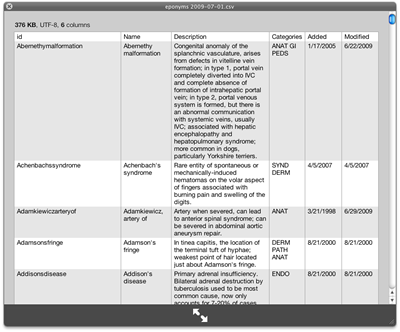 I have been using Macs for three years now. Yet I did not know you can install additional plugins for QuickLook so that you can quickly view different types of file in the finder just by pressing the spacebar ! I work with CSV files a lot and it has always been a pain having to open them in numbers or openoffice to view them. Now come (free) CSV quicklook plugins.
You can find a lot of different plugins at
I have been using Macs for three years now. Yet I did not know you can install additional plugins for QuickLook so that you can quickly view different types of file in the finder just by pressing the spacebar ! I work with CSV files a lot and it has always been a pain having to open them in numbers or openoffice to view them. Now come (free) CSV quicklook plugins.
You can find a lot of different plugins at  Christmas and last week of the year is traditionally clean-up and catch-up time for me. One project that I have been putting of again and again is to redesign my personal website. Here we are -- I spent the last two days learning blueprint, the grid based CSS framework, throw in a bit of CSS coding, and redesigned my personal site.
I am also going to split up my larger "brands" into separate sites. I find that visitors to this site sometimes get lost in big mashup of information here. I am going to use the personal site for more personal and general writing. The Django, parenting, and CTO related materials will be moved off to other sites.
Christmas and last week of the year is traditionally clean-up and catch-up time for me. One project that I have been putting of again and again is to redesign my personal website. Here we are -- I spent the last two days learning blueprint, the grid based CSS framework, throw in a bit of CSS coding, and redesigned my personal site.
I am also going to split up my larger "brands" into separate sites. I find that visitors to this site sometimes get lost in big mashup of information here. I am going to use the personal site for more personal and general writing. The Django, parenting, and CTO related materials will be moved off to other sites.